Appearance
Admin: records
PODCAST
- We already created a
admin/recordspage in the Eloquent models section - This page was not meant to be a real admin page, but was only to show how to use Eloquent models and was build with our first Livewire component
- In this chapter we will create a new records page with CRUD operations
REMARK
Remember that you can always reset the database to its initial state by running the command:
bash
php artisan migrate:fresh --seedPreparation
Create a Records component
- Create a new Livewire component with the terminal command
php artisan livewire:make Admin/Records- app/Livewire/Admin/Records.php (the component class)
- resources/views/livewire/admin/records.blade.php (the component view)
- Open the component class and change the layout to
layouts.vinylshop
php
<?php

namespace App\Livewire\Admin;

use Livewire\Attributes\Layout;
use Livewire\Component;

class Records extends Component
{
    #[Layout('layouts.vinylshop', ['title' => 'Records', 'description' => 'Manage the records of your vinyl records',])]
    public function render()
    {
        return view('livewire.admin.records');
    }
}Update the route
- Update the get-route for the Records to the routes/web.php file
- Update the navigation menu in resources/views/components/layout/nav.blade.php
(ReplaceDemo::classwithRecords::class)
php
Route::middleware(['auth', Admin::class, ActiveUser::class])->prefix('admin')->name('admin.')->group(function () {
    Route::redirect('/', '/admin/records');
    Route::get('genres', Genres::class)->name('genres');
    Route::get('records', Records::class)->name('records');
});
...Basic scaffolding
- Open the resources/views/livewire/admin/records.blade.php and replace the content with the code beneath
- On top of the page, we have a
x-tmk.sectionfor the filters and a button to create a new record - Below the filters, we have a second
x-tmk.sectionfor the table with the records - At the bottom of the page, stands a
x-dialog-modalfor the create and update functions- Line 79: the modal is by default hidden and will be shown when the
showModalproperty in the component class is set totrue - Line 87: use Alpine's
@clickdirective to set theshowModalproperty tofalsewhen the Cancel button is clicked
- Line 79: the modal is by default hidden and will be shown when the
blade
<div>
    {{-- Filter --}}
    <x-tmk.section class="mb-4 flex items-center gap-2">
        <div class="flex-1">
            <x-tmk.form.search placeholder="Filter Artist Or Record"
                               class="placeholder-gray-300"/>
        </div>
        <x-tmk.form.switch id="noStock"
                           text-off="No stock" color-off="text-gray-400 font-light bg-gray-100 before:line-through"
                           text-on="No stock" color-on="text-white bg-rose-600"
                           class="w-20 mt-1" />
        <x-tmk.form.switch id="noCover"
                           text-off="Records without cover" color-off="text-gray-400 font-light bg-gray-100 before:line-through"
                           text-on="Records without cover" color-on="text-white bg-rose-600"
                           class="w-48 mt-1" />
        <x-tmk.form.button color="info" class="mt-1">
            new record
        </x-tmk.form.button>
    </x-tmk.section>

    {{-- Table with records --}}
    <x-tmk.section>
        <table class="text-center w-full border border-gray-300">
            <colgroup>
                <col class="w-14">
                <col class="w-20">
                <col class="w-20">
                <col class="w-14">
                <col class="w-max">
                <col class="w-24">
            </colgroup>
            <thead>
            <tr class="bg-gray-100 text-gray-700 [&>th]:p-2">
                <th>#</th>
                <th></th>
                <th>Price</th>
                <th>Stock</th>
                <th class="text-left">Record</th>
                <th>
                    <x-tmk.form.select id="perPage"
                                       class="block mt-1 w-full">
                        @foreach([5, 10, 15, 20] as $value)
                            <option value="{{ $value }}">{{ $value }}</option>
                        @endforeach
                    </x-tmk.form.select>
                </th>
            </tr>
            </thead>
            <tbody>
            <tr class="border-t border-gray-300">
                <td>...</td>
                <td>
                    <img src="/storage/covers/no-cover.png"
                         alt="no cover"
                         class="my-2 border object-cover">
                </td>
                <td>...</td>
                <td>...</td>
                <td class="text-left">...</td>
                <td>
                    <div class="border border-gray-300 rounded-md overflow-hidden m-2 grid grid-cols-2 h-10">
                        <button
                            class="text-gray-400 hover:text-sky-100 hover:bg-sky-500 transition border-r border-gray-300">
                            <x-phosphor-pencil-line-duotone class="inline-block size-5"/>
                        </button>
                        <button
                            class="text-gray-400 hover:text-red-100 hover:bg-red-500 transition">
                            <x-phosphor-trash-duotone class="inline-block size-5"/>
                        </button>
                    </div>
                </td>
            </tr>
            </tbody>
        </table>
    </x-tmk.section>

    {{-- Modal for add and update record --}}
    <x-dialog-modal id="recordModal"
                    wire:model.live="showModal">
        <x-slot name="title">
            <h2>title</h2>
        </x-slot>
        <x-slot name="content">
            content
        </x-slot>
        <x-slot name="footer">
            <x-secondary-button @click="$wire.showModal = false">Cancel</x-secondary-button>
        </x-slot>
    </x-dialog-modal>
</div>Read all records
Show all the records in the table
- Line 8 end 12: add the WithPagination trait to the class
- Line 25 - 26: get all the records from the database and order them by artist and title
- Line 27: paginate the records
- Line 28: send the records to the view
php
<?php

namespace App\Livewire\Admin;

use App\Models\Record;
use Livewire\Attributes\Layout;
use Livewire\Component;
use Livewire\WithPagination;

class Records extends Component
{
    use WithPagination;

    // filter and pagination
    public $search;
    public $noStock = false;
    public $noCover = false;
    public $perPage = 5;
    // show/hide the modal
    public $showModal = false;

    #[Layout('layouts.vinylshop', ['title' => 'Records', 'description' => 'Manage the records of your vinyl records',])]
    public function render()
    {
        $records = Record::orderBy('artist')
            ->orderBy('title')
            ->paginate($this->perPage);
        return view('livewire.admin.records', compact('records'));
    }
}Add pagination to the table
- Line 14: bind the select element to the
$perPageproperty - Line 2 and 25 add the pagination links before and after the table
php
<x-tmk.section>
  <div class="my-4">{{ $records->links() }}</div>
  <table class="text-center w-full border border-gray-300">
      <colgroup> ... </colgroup>
      <thead>
      <tr class="bg-gray-100 text-gray-700 [&>th]:p-2">
          <th>#</th>
          <th></th>
          <th>Price</th>
          <th>Stock</th>
          <th class="text-left">Record</th>
          <th>
              <x-tmk.form.select id="perPage"
                                 wire:model.live="perPage"
                                 class="block mt-1 w-full">
                  @foreach([5, 10, 15, 20] as $value)
                      <option value="{{ $value }}">{{ $value }}</option>
                  @endforeach
              </x-tmk.form.select>
          </th>
      </tr>
      </thead>
      <tbody> ... </tbody>
  </table>
  <div class="my-4">{{ $records->links() }}</div>
</x-tmk.section>Filter by artist or title
- Line 10: add the scope
searchByArtistOrTitle(), that we made earlier in this course, to the query
php
class Records extends Component
{
    ...

   #[Layout('layouts.vinylshop', ['title' => 'Records', 'description' => 'Manage the records of your vinyl records',])]
    public function render()
    {
        $records = Record::orderBy('artist')
            ->orderBy('title')
            ->searchTitleOrArtist($this->search)
            ->paginate($this->perPage);
        return view('livewire.admin.records', compact('records'));
    }
}Filter by records in stock
- The
<x-tmk.form.switch id="noStock" ... />is just a wrapper around a checkbox - The state of this checkbox determines whether we should filter or not
- If
checked, filter the query further by->where('stock', '=', 0)
(or->where('stock', 0)or->where('stock', false)) - If
unchecked, skip this filter
- If
Step 1
- Because the
$noStockfilter is sometimes applied (whentrueor1) and sometimes not (whenfalseor0), we need to split the query in two parts - The result of the total query is exactly the same as before
- Replace the previous query with the following code:
(Nothing changes in the result, because the$noStockfilter isn't implemented yet)
php
class Records extends Component
{
    ...

    #[Layout('layouts.vinylshop', ['title' => 'Records', 'description' => 'Manage the records of your vinyl records',])]
    public function render()
    {
        // filter by $search
        $query = Record::orderBy('artist')
            ->orderBy('title')
            ->searchTitleOrArtist($this->search);
        // paginate the $query
        $records = $query
            ->paginate($this->perPage);
        return view('livewire.admin.records', compact('records'));
    }
}Filter by records without cover image
- The
<x-tmk.form.switch id="noCover" ... />acts just the same as the switch for$noStock
(iftrue: filter, iffalse: skip filter) - The problem is that we don't have a column for the cover in the database!
- Yes, we have a "generated" column
cover, but this is only available AFTER the->get()(or->paginate()) method is called - So, we can't use this in our filter 😔
- Yes, we have a "generated" column
- We can make a scope for this in the Record model and use it in our query
- Open the model app/Models/Record.php
- Add a new scope that returns only records when there is no cover available in the
public/storage/coversfolder- Line 10: use the
pluck()method to fill the$mb_idsarray with themb_idvalues
IMPORTANT: ONLY the result from the previous query is used in this scope!
(e.g.im_dbs = ['fcb78d0d-8067-4b93-ae58-1e4347e20216', 'd883e644-5ec0-4928-9ccd-fc78bc306a46', ...]) - Line 12: initialize an empty array
$covers - Line 13 - 23: loop through the
$mb_idsarray and check if the cover exists in thepublic/storage/coversfolder
Depending on the state of the$existsfilter, themb_idis added to the$coversarray - Line 25:
whereIn()returns only the records where it'smb_idvalue is available in the$coversarray
- Line 10: use the
- IMPORTANT:
- open the menu Laravel > Generate Helper Code to add the new scope for type hinting and auto-completion in PhpStorm
php
...

public function scopeMaxPrice($query, $price) { ... }

public function scopeSearchTitleOrArtist($query, $search = '%') { ...}

public function scopeCoverExists($query, $exists = true)
{
    // make an array with all the mb_id attributes
    $mb_ids = $query->pluck('mb_id');
    // empty array to store 'mb_id's that have a cover
    $covers = [];
    foreach ($mb_ids as $mb_id) {
        // $exists = true: if the cover exists, add the mb_id to the $covers array
        // $exists = false: if the cover does not exist, add the mb_id to the $covers array
        if ($exists) {
            if (Storage::disk('public')->exists('covers/' . $mb_id . '.jpg'))
                $covers[] = $mb_id;
        } else {
            if (!Storage::disk('public')->exists('covers/' . $mb_id . '.jpg'))
                $covers[] = $mb_id;
        }
    }
    // return only the records with the mb_id in the $covers array
    return $query->whereIn('mb_id', $covers);
}Introduction Livewire Form objects
- In previous chapters, form input elements were just public properties in the component class itself
- This is perfectly fine for simple forms, but for more complex forms, LiveWire offers a better solution: Livewire Form objects
- A Livewire Form object is an extra class that:
- contains public properties that represent the form input elements
- every property can have validation rules (just like in the component class we used before)
- contains methods to handle the form submission where validation is required like
create()andupdate()(The read and delete methods are omitted from the Form object, because they not need validation) - can send notifications to the browser
- A Form object has no separate view file, has no
render(),mount(), ... methods and is not a full-blown Livewire component! - The Form object class is just a nice way to keep your main component class clean by grouping all the form logic in a separate class, and it's a great way to reuse form logic across multiple components
Create a new Form object
- Create a form object class for the records with the command
php artisan livewire:form RecordForm - This will create a new class file RecordForm.php in the folder App\Livewire\Forms
- Open the file and replace the content with the following code:
php
<?php

namespace App\Livewire\Forms;

use App\Models\Record;
use Livewire\Attributes\Validate;
use Livewire\Form;

class RecordForm extends Form
{
    public $id = null;
    #[Validate('required', as: 'name of the artist')]
    public $artist = null;
    #[Validate('required', as: 'title for this record')]
    public $title = null;
    #[Validate('required|size:36|unique:records,mb_id,id', as: 'MusicBrainz ID')]
    public $mb_id = null;
    #[Validate('required|numeric|min:0', as: 'stock')]
    public $stock = null;
    #[Validate('required|numeric|min:0', as: 'price')]
    public $price = null;
    #[Validate('required|exists:genres,id', as: 'genre')]
    public $genre_id = null;
    public $cover = '/storage/covers/no-cover.png';

    // create a new record
    public function create()
    {
        $this->validate();
        Record::create([
            'artist' => $this->artist,
            'title' => $this->title,
            'mb_id' => $this->mb_id,
            'stock' => $this->stock,
            'price' => $this->price,
            'genre_id' => $this->genre_id,
        ]);
    }

    // update the selected record
    public function update(Record $record) {
        $this->validate();
        $record->update([
            'stock' => $this->stock,
            'price' => $this->price,
            'genre_id' => $this->genre_id,
        ]);
    }
}- The code in this component is straightforward and doesn't need much explanation.
- For the validation rules:
$artistand$titleare required$mb_idis required, must be 36 characters long and must be unique in therecordstable$stockand$priceare required and must be numeric and greater than or equal to 0$genre_idis required and must be an existing genre id in thegenrestable
Use the Form object in the component class
- Now that we have a form object, we can use it in our component class
- Add the following code to the component class app/Livewire/Admin/Records.php:
php
<?php

namespace App\Livewire\Admin;

use App\Livewire\Forms\RecordForm;
use App\Models\Record;
...

class Records extends Component
{
    use WithPagination;

    // filter and pagination
    public $search;
    public $noStock = false;
    public $noCover = false;
    public $perPage = 5;
    // show/hide the modal
    public $showModal = false;

    public RecordForm $form;

    ...
}HOW TO USE THE FORM OBJECT
- With
public RecordForm $form;, the public property$formis of typeRecordFormand contains all the properties and methods of theRecordFormclass - Now we can use the
$formobject in our component class and in the view with the$formprefix - Us the
$formproperties in the view:$form->titleto echo the title of the recordwire:model="form.title"to bind the input element to the$form->titleproperty@error('form.title')to show the error message for the$form->titleproperty
- Use the
$formmethodes in the component:$this->form->create()to create a new record$this->form->update($record)to update the selected record
Create a new record
Find the MusicBrainz ID (mb_id) of the record
- Before we can add a new record, we need to find the unique MusicBrainz ID of a record
- Go to https://musicbrainz.org/
- Search, in the right top corner, an artist (e.g. The Doors)
- Click on the artist name
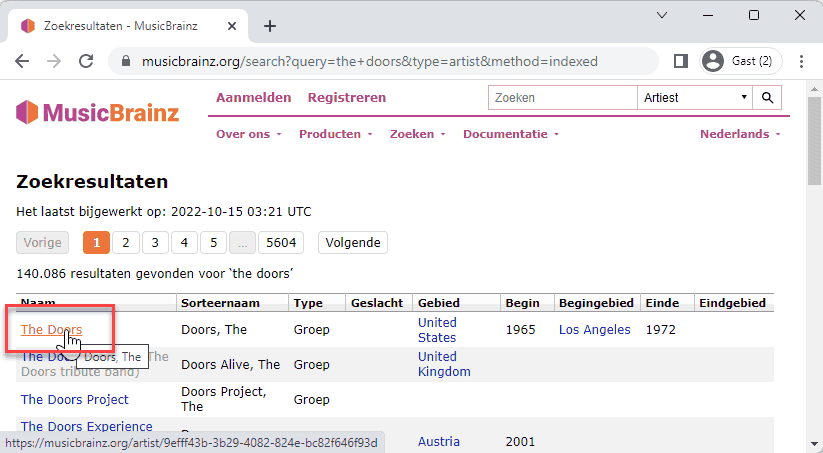
- Now click on one of the albums (e.g. L.A. Woman)
- You get a list of all the releases of this album. Click on one of them (be sure to choose for a release on vinyl!).
- The property mb_id in our records table is the code at the end of the URL (e.g.
e68f23df-61e3-4264-bfc3-17ac3a6f856b)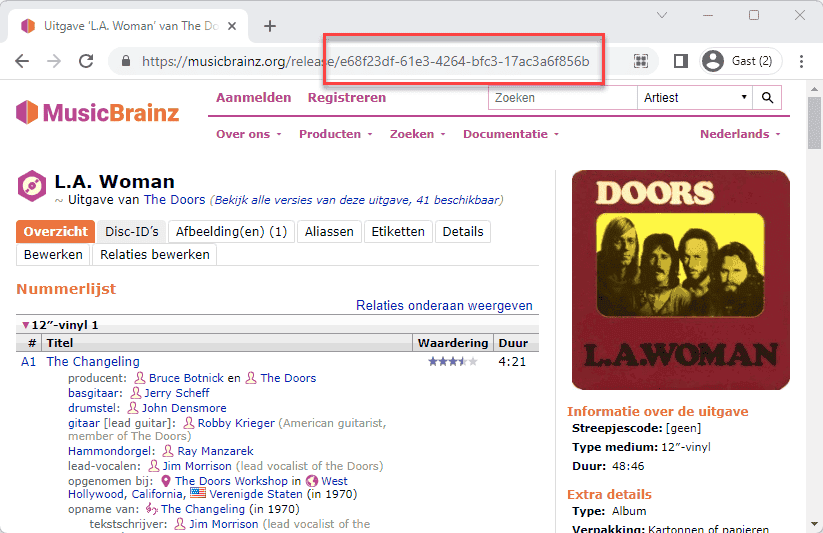
Get the data from MusicBrainz API
- Now that we have the mb_id of the record, we can use the MusicBrainz API to extract the data from the record
- We need: the title of the record, the artist and the cover (if there is one)
These fields are not editable, except for the cover later in this course - We also need the price of the record, how many items are in stock and the genre this record belongs to
These fields are editable and don't have anything to do with the MusicBrainz API - Some examples on how the extract the data that we need from the JSON response:
- mb_id:
e68f23df-61e3-4264-bfc3-17ac3a6f856b - API: https://musicbrainz.org/ws/2/release/e68f23df-61e3-4264-bfc3-17ac3a6f856b?inc=artists&fmt=json
$response->title= L.A. Woman$response->artist-credit[0]->artist->name= The Doors$response->cover-art-archive->front= true- cover is available on https://coverartarchive.org/release/e68f23df-61e3-4264-bfc3-17ac3a6f856b/front-250.jpg
Update the modal
Our modal needs to have the following fields:
- mb_id (text input)
- title and artist (hidden inputs because they are not editable)
- genre (select input with all the genres)
- price and stock (number inputs)
Now we can populate the modal
- Add a new public method
fetchRecord()and a private methodfetchAndStoreCover()to theRecordFormclass - Line 20 - 21: reset the error bag and validate ONLY the
mb_idfield
(The rest of the code will only be executed if themb_idfield is valid) - Line 23: try to fetch the data from the MusicBrainz API
- Line 25 - 34: the API call was successful:
- update the
artistandtitleproperties with the data from the API - check if the cover is available
- if yes, call the
fetchAndStoreCover()method - if no, set the
coverproperty to the default cover image
- if yes, call the
- update the
- Line 36 - 38: the API call failed: reset the
artist,titleandcoverproperties to their original state
- Line 25 - 34: the API call was successful:
- Line 43 - 51: the
fetchAndStoreCover()method:- Line 45: create the URL of the cover image, based on the
mb_idvalue - Line 46: get the raw image from the URL
- Line 47: get the base64 data from the image
- Line 48: use the Intervention Image package to read and compress the original image data to a
JPGfile with a quality of75% - Line 49: use Laravel's File Storage to save the image to the
publicdisk in thecoversfolder with the namemb_idvalue and the extension.jpg - Line 50: update the
coverproperty with the path to the new cover image
- Line 45: create the URL of the cover image, based on the
php
<?php
namespace App\Livewire\Forms;
use App\Models\Record;
use Http;
use Intervention\Image\Laravel\Facades\Image;
use Livewire\Attributes\Validate;
use Livewire\Form;
use Storage;
Test the modal and the validation rules
- Leave the MusicBrainz ID field empty and click on the Get Record info button
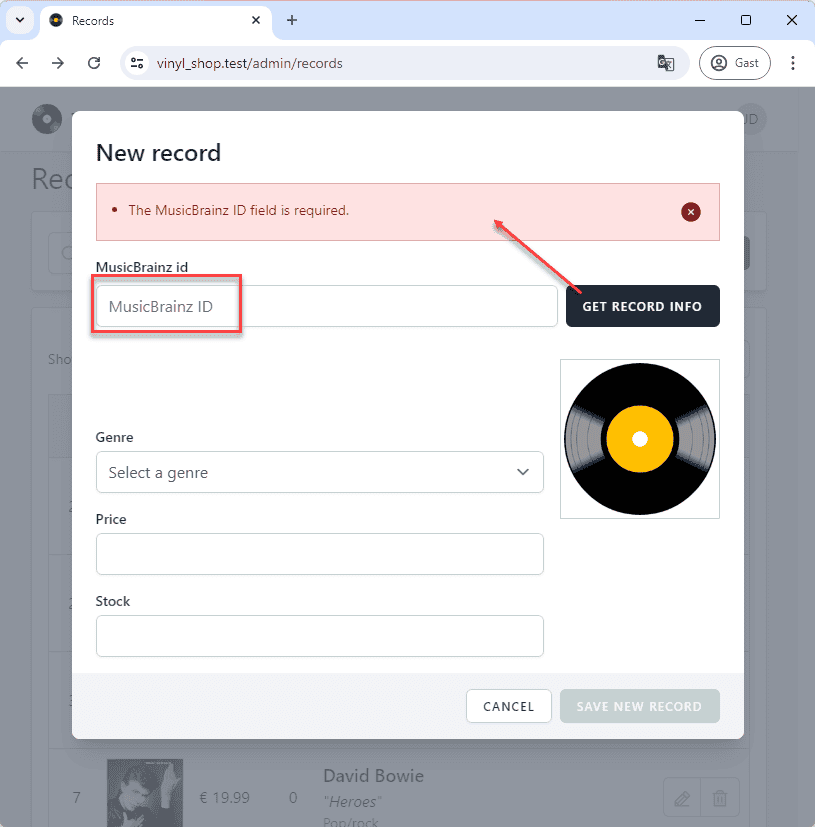
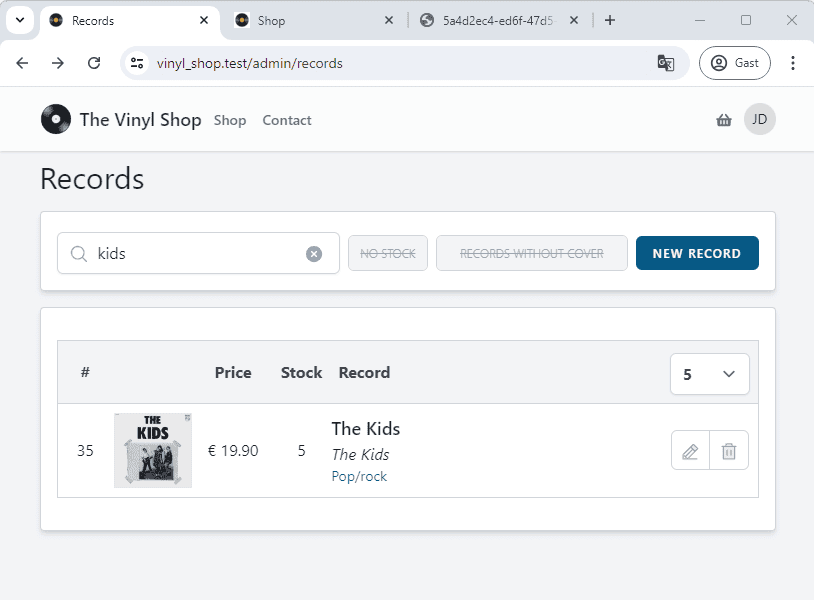
- The cover for the record with MusicBrainz ID
5a4d2ec4-ed6f-47d5-9352-c11917f61dc0is available on http://vinyl_shop.test/storage/covers/5a4d2ec4-ed6f-47d5-9352-c11917f61dc0.jpg - And we find the record on the admin page, as well as on the shop page
Update a record
- All we have to do to edit a record is to set the properties of the
RecordFormclass to the values of the record we want to edit - This can be done by passing the record
idto theupdate(Record $record)method, and then we can also re-use the modal to update the record - We're only allowed to update the
genre_id, thestockand thepricefields - The
mb_id, thetitleand theartistfields are read-only (updating themb_idwould mean that we create a new record) - The
coverfield is also not editable for now, but we'll add this functionality later in this course
Enter edit mode
- Line 3: add a
wire:keyto thetrelement to make sure that each row has a unique key - Line 13: add a
wire:clickto the edit button to call theeditRecord()method with the recordidas parameter
php
@forelse($records as $record)
    <tr
      wire:key="{{ $record->id }}"
      class="border-t border-gray-300">
      <td>{{ $record->id }}</td>
      <td> ... </td>
      <td>{{ $record->price_euro }}</td>
      <td>{{ $record->stock }}</td>
      <td class="text-left"> ... </td>
      <td>
          <div class="border border-gray-300 rounded-md overflow-hidden m-2 grid grid-cols-2 h-10">
              <button
                  wire:click="editRecord({{ $record->id }})"
                  class="text-gray-400 hover:text-sky-100 hover:bg-sky-500 transition border-r border-gray-300">
                  <x-phosphor-pencil-line-duotone class="inline-block size-5"/>
              </button>
              <button
                  class="text-gray-400 hover:text-red-100 hover:bg-red-500 transition">
                  <x-phosphor-trash-duotone class="inline-block size-5"/>
              </button>
          </div>
      </td>
  </tr>
@empty
    ...
@endforelseRefactor the modal
- We can use e.g. the value of the
$form->idproperty to determine if we're in edit mode or not$form->idis empty: we're in create mode$form->idis not empty: we're in edit mode
- Use the PHP
is_null($form->id)function to determine if we're in edit mode or not - In edit mode
is_null($form->id)isfalse:- Line 4: change the title of the modal from New record to Edit record
- Line 11, 17 - 22: remove the Save new record button and add a Save changes button in edit mode
- The Save changes button calls the
updateRecord()method and pass theidof the record as parameter
- The Save changes button calls the
php
<x-dialog-modal id="recordModal"
                wire:model.live="showModal">
    <x-slot name="title">
        <h2>{{ is_null($form->id) ? 'New record' : 'Edit record' }}</h2>
    </x-slot>
    <x-slot name="content">
        ...
    </x-slot>
    <x-slot name="footer">
        <x-secondary-button @click="$wire.showModal = false">Cancel</x-secondary-button>
        @if(is_null($form->id))
          <x-tmk.form.button color="success"
                             disabled="{{ $form->title ? 'false' : 'true' }}"
                             wire:click="createRecord()"
                             class="ml-2">Save new record
          </x-tmk.form.button>
        @else
          <x-tmk.form.button color="info"
                             wire:click="updateRecord({{ $form->id }})"
                             class="ml-2">Save changes
          </x-tmk.form.button>
        @endif
    </x-slot>
</x-dialog-modal>Update the record
- Line 7: use route model binding to get the record to update
(The values will first be validated by theupdate()method in theRecordFormclass) - Line 8: hide the modal
- Line 9 - 13 show a success toast message
php
class Records extends Component
{
    ...

    public function updateRecord(Record $record)
    {
        $this->form->update($record);
        $this->showModal = false;
        $this->swalToast("The record <b><i>{$this->form->title}</i></b> from <b><i>{$this->form->artist}</i></b> has been updated",
            'info', [
                'icon' => 'success'
            ]);
    }

    ...
}Fix the "unique" validation rule
- We need to change the validation rules for the
mb_idfield - This cannot be done with the
#[Validate()]attribute because this attribute can only use static values, not dynamic values - We need to refactor the
#[Validate()]attribute to therules()method andasto$validationAttributes
- **Line 8 - 9 **: replace the (static)
#[Validate(...)]attribute from themb_idproperty with just#[Validate]
(#[Validate]without the()!)- This will use the
rules()method to define the validation rules
- This will use the
- Line 20 - 25: add a new
rules()method to theRecordFormclass- Line 23:
"required|size:36|unique:records,mb_id,{$this->id}"will check:- the
mb_idfield isrequired - the
mb_idfield has asizeof exact36characters - the
mb_idvalue isuniquein therecordstable, except for the record with his ownid
- the
- Line 23:
- Line 28 - 30: add a new
$validationAttributesproperty to theRecordFormclass- This property is used to replace the attribute name in the error message
'mb_id' => 'MusicBrainz ID'will replace the attribute namemb_idwithMusicBrainz IDin the error message
(#[Validate()]usesaswhererules()uses$validationAttributesto define the attribute name)
php
class RecordForm extends Form
{
    public $id = null;
    #[Validate('required', as: 'name of the artist')]
    public $artist = null;
    #[Validate('required', as: 'title for this record')]
    public $title = null;
    // #[Validate('required|size:36|unique:records,mb_id,id', as: 'MusicBrainz ID')]
    #[Validate]
    public $mb_id = null;
    #[Validate('required|numeric|min:0', as: 'stock')]
    public $stock = null;
    #[Validate('required|numeric|min:0', as: 'price')]
    public $price = null;
    #[Validate('required|exists:genres,id', as: 'genre')]
    public $genre_id = null;
    public $cover = '/storage/covers/no-cover.png';

    // special validation rule for mb_id (unique:records,mb_id,id) for insert and update!
    public function rules()
    {
        return [
            'mb_id' => "required|size:36|unique:records,mb_id,{$this->id}",
        ];
    }

    // $validationAttributes is used to replace the attribute name in the error message
    protected $validationAttributes = [
        'mb_id' => 'MusicBrainz ID',
    ];

    ...
}Delete a record
- Line 19: use the Livewire
wire:confirmfunction to ask the user if he really wants to delete the record - Line 18: delete the record when the user clicks on the OK button
php
@forelse($records as $record)
    <tr
        wire:key="record_{{ $record->id }}"
        class="border-t border-gray-300">
        <td>{{ $record->id }}</td>
        <td> ... </td>
        <td>{{ $record->price_euro }}</td>
        <td>{{ $record->stock }}</td>
        <td class="text-left"> ... </td>
        <td>
          <div class="border border-gray-300 rounded-md overflow-hidden m-2 grid grid-cols-2 h-10">
              <button
                  wire:click="editRecord({{ $record->id }})"
                  class="text-gray-400 hover:text-sky-100 hover:bg-sky-500 transition border-r border-gray-300">
                  <x-phosphor-pencil-line-duotone class="inline-block size-5"/>
              </button>
              <button
                  wire:click="deleteRecord({{ $record->id }})"
                  wire:confirm="Are you sure you want to delete this record?"
                  class="text-gray-400 hover:text-red-100 hover:bg-red-500 transition">
                  <x-phosphor-trash-duotone class="inline-block size-5"/>
              </button>
          </div>
      </td>
    </tr>
@empty
    ...
@endforelseCreate an error-bag component
- Let's refactor the alert box to a standalone component so we can re-use it in other parts of the application
- Create a new component
error-bag.blade.phpin theresources/views/components/tmkfolder
- Line 4 - 12: cut the error messages and paste them in the new
error-bag.blade.phpcomponent - Line 2: add the new
<x-tmk.error-bag />component in place of the old error messages
php
{{-- error messages --}}
<x-tmk.error-bag />
{{--
@if ($errors->any())
    <x-tmk.alert type="danger">
        <x-tmk.list>
            @foreach ($errors->all() as $error)
                <li>{{ $error }}</li>
            @endforeach
        </x-tmk.list>
    </x-tmk.alert>
@endif
--}}EXERCISES:
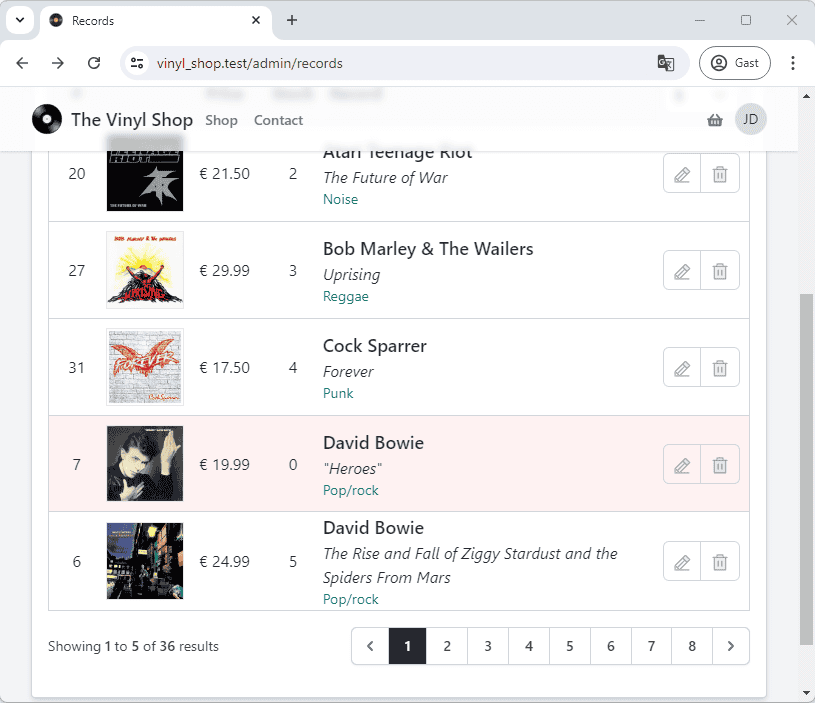
1: Background color
- Give all the records that are out of stock a red background color
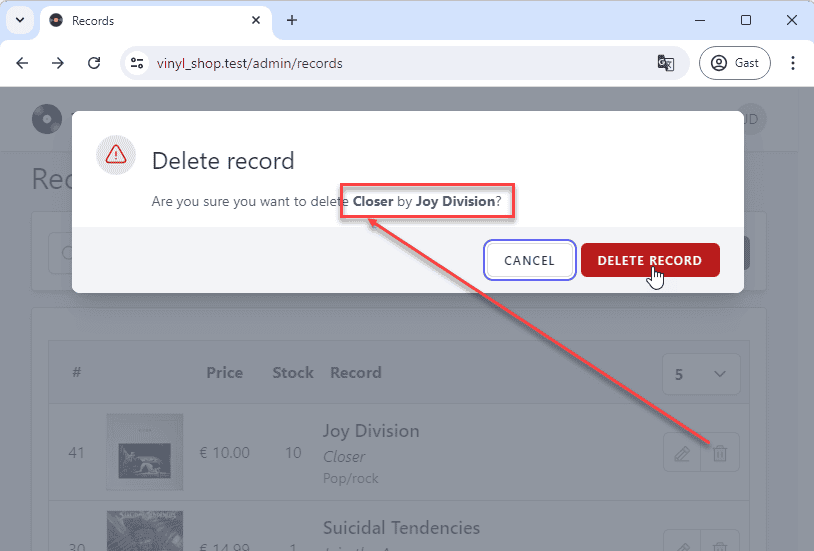
2: Delete the cover image from the server
- Update the
delete()method inside theRecordsclass so that the cover image is also deleted from the server
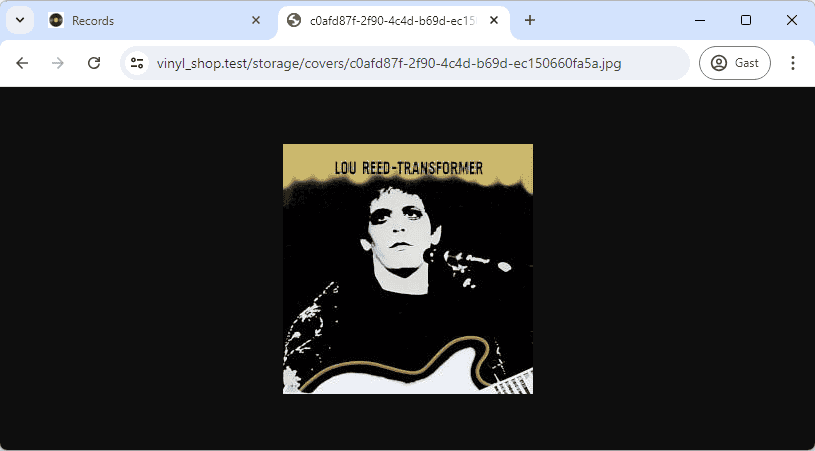
- Add a new record with a cover image (e.g mb_id =
c0afd87f-2f90-4c4d-b69d-ec150660fa5a) - Open the cover in a new browser tab: http://vinyl_shop.test/storage/covers/c0afd87f-2f90-4c4d-b69d-ec150660fa5a.jpg
3: Jetstream confirmation modal
- Jetstream has actually two modal components:
x-confirmation-modalandx-dialog-modal
(see resources/views/components/) - Examine the code for the confirmation modal and try to use them to confirm the deletion of a record
- TIPS:
- add a new property to toggle the modal
- add a new method to update some values in the
$formclass, so they can be used in the modal