Appearance
Shop: filter section
PODCAST
Add form elements to the view
- Add all form elements that we need for the filter to the view
- Most of the form elements are Jetstream components
(Tip:Ctrl + Clickon the component name to see how the component is implemented) - There is no
formtag, because we don't need to submit the form
(Any change in the form elements will trigger theupdatedmethod and the results will be updated automatically) - None of the input elements have a
valueattribute
(Thevalueattribute is not needed, because thewire:modelattribute is used)
php
{{-- filter section: artist or title, genre, max price and records per page --}}
<div class="grid grid-cols-10 gap-4">
<div class="col-span-10 md:col-span-5 lg:col-span-3">
<x-label for="filter" value="Filter"/>
<x-tmk.form.search
id="filter"
placeholder="Filter Artist Or Record"/>
</div>
<div class="col-span-5 md:col-span-2 lg:col-span-2">
<x-label for="genre" value="Genre"/>
<x-tmk.form.select id="genre"
class="block mt-1 w-full">
<option value="%">All Genres</option>
</x-tmk.form.select>
</div>
<div class="col-span-5 md:col-span-3 lg:col-span-2">
<x-label for="perPage" value="Records per page"/>
<x-tmk.form.select id="perPage"
                   class="block mt-1 w-full">
    @foreach ([3,6,9,12,15,18,24] as $value)
        <option value="{{ $value }}">{{ $value }}</option>
    @endforeach
</x-tmk.form.select>
</div>
<div class="col-span-10 lg:col-span-3">
<x-label for="price">Price ≤
<output id="priceFilter" name="priceFilter"></output>
</x-label>
<x-input type="range" id="price" name="price"
min="0"
max="100"
oninput="priceFilter.value = price.value"
class="block mt-4 w-full h-2 bg-indigo-100 accent-indigo-600 appearance-none"/>
</div>
</div>Dropdown records per page
- Because we are lazy developers we don't want to write all the options manually
- We use a more dynamic way for building the dropdown with an array of values:
php
<x-tmk.form.select id="perPage"
class="block mt-1 w-full">
@foreach ([3,6,9,12,15,18,24] as $value)
<option value="{{ $value }}">{{ $value }}</option>
@endforeach
</x-tmk.form.select>Two-way data binding with LiveWire
- Two-way data binding is a concept where changes in the controller are automatically reflected in the UI (the view) and vice versa
- This is a common feature in modern web frameworks (Angular, Vue.js, ...) and is also available in Livewire
- For example:
- if you change the value of an input box (the view), then it will also update the value of the attached PUBLIC property in a component class
- similarly, if the property changes in the component, the view listens to the change and updates itself immediately
- A simple (fictive) example to illustrate this concept:
- The component has a public property
$filter
php
class MyNameIs extends Component
{
    public $filter;
}- Assuming
$foois a public property on the component class, than these are the possible ways to bind (wire) the property to a form element:
| Directive | Description |
|---|---|
wire:model.live | updates the property when the form element changes (useful for things like a real-time search) |
wire:model.blur | updates the property when the form element loses focus (e.g. tabs out of a text field) |
wire:model.live.debounce.500ms | updates the property after a break of xxx-ms typing when typing in a text field |
wire:model.live.throttle.500ms | updates the property every xxx-ms when typing in a text field |
wire:model | updates the property deferred (e.g. when the form is submitted with wire:submit or a wire:click event is fired) |
- Now that we understand the concept of two-way data binding, we can start with the implementation of the filter
IMPORTANT (Livewire v2 vs v3)
- The
wire:modelin Livewire version 3 works very different from thewire:modelversion 2 - When you search for examples on the internet, make sure that you use the correct version!
Basic filter
- Let's start by adding 3 extra public properties to the Shop component
- the
$filterproperty will be bound to the filter field - the
$genreproperty will be bound to the genre select element - the
$perPageproperty will be bound to the records per page select element
- the
php
 // public properties
public perPage = 6;
public $filter;
public $genre = '%';
public $price;

public $loading = 'Please wait...';
public $selectedRecord;
public $showModal = false;Pagination
- Add the
wire:model.live="perPage"attribute select element - As a result, the default selected value of the dropdown will be set to
6(= the default value of the$perPageproperty)
and every change in the dropdown will be immediately visible in the view
php
<div class="col-span-5 md:col-span-3 lg:col-span-2">
    <x-label for="perPage" value="Records per page"/>
    <x-tmk.form.select id="perPage"
                       wire:model.live="perPage"
                       class="block mt-1 w-full">
        @foreach ([3,6,9,12,15,18,24] as $value)
            <option value="{{ $value }}">{{ $value }}</option>
        @endforeach
    </x-tmk.form.select>
</div>IMPORTANT!
- There is one little problem with the pagination
- Set the Records per page to
6 - Go to page
6of the navigation - Set the Records per page to
12 - The page is empty, because we're still on page
6and there are only 3 pages this time - This can be solved by resetting the page to
1every time the$perPageproperty is updated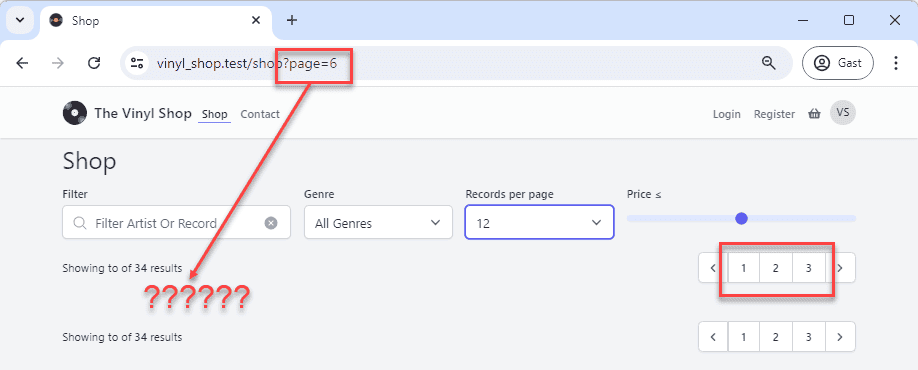
Resetting the page
- When filtering or sorting a result, you always have to reset the pagination to page
1 - Livewire has a
$this->resetPage()method that can be used for this purpose and can be called from anywhere in the component - Livewire also has a special
updated()method that is called every time a property is updated and this is the perfect place to reset the page - Add the
updated()method to the component and test the filter again:
- Line 7 - 12: add the
updated()method to the component$property: The name of the current property being updated$value: The value of the updated property
- Line 9 - 10: if one of the properties of our filter (
perPage,filter,genreorprice) is updated, reset the page to1
php
class Shop extends Component
{
   ...

    public function updated($property, $value)
    {
        // $property: The name of the current property being updated
        // $value: The value about to be set to the property
        if (in_array($property, ['perPage', 'filter', 'genre', 'price']))
            $this->resetPage();
    }

    public function showTracks(Record $record) { ... }

    #[Layout('layouts.vinylshop', ['title' => 'Shop', 'description' => 'Welcome to our shop'])]
    public function render()) { ... }
}Fill the genre select element
- Get, inside the
render()method, all the genres that has records and add them to the select element
- Line 3 - 6: select all the genres that has records (most of the genres don't have records) and count the number of records for each genre
- Line 9: add
allGenresto thecompactarray
php
public function render()
{
    $allGenres = Genre::has('records')
            ->withCount('records')
            ->orderBy('name')
            ->get();
    $records = Record::orderBy('artist')
        ->paginate($this->perPage);
    return view('livewire.shop', compact('records', 'allGenres'));
}IMPORTANT
We can't use @foreach($allGenres as $genre) because $genre is already a property in the component.
That's the reason why we use @foreach($allGenres as $g) instead of @foreach($allGenres as $genre)
Filter by genre
- We have to extend the
Recordquery with awhere()clause to filter the records by genre
- Line 8: order the records by
artistand then bytitle(we can use theorderBymethod multiple times) - Line 9: retrieve only the records that have a
genre_idthat contains the select$genreproperty - Important: we must use the
likeoperator instead of the=operator because the$genreproperty can be:- a number when a genre is selected
- or a
%sign if "all genres" are selected
php
public function render()
{
    $allGenres = Genre::has('records')
        ->withCount('records')
        ->orderBy('name')
        ->get();
    $records = Record::orderBy('artist')
        ->orderBy('title')
        ->where('genre_id', 'like', $this->genre)
        ->paginate($this->perPage);
    return view('livewire.shop', compact('records', 'allGenres'));
}Update the range input element with min and max values
TIP
- Remember that the
render()method is called every time a property is updated - Because the minimum and maximum price is not going to change, we can use the
render()method, but this will slow down the page load and that's not what we want - Livewire has a
mount()method that is called only once, when the component is loaded and just before the firstrender()method is called
- Set the
minandmaxvalues of the range input element to the minimum and maximum price of the records - Therefore, we need the extra properties
$priceMinand$priceMax- The
minandmaxvalues will also be calculated in themount()method because they are not going to change
- The
- Line 6: add the properties
$priceMinand$priceMax - Line 16: use the min() method to calculate the minimum price in the records collection and round it down to the nearest integer
- Line 17: use the max() method to calculate the maximum price in the records collection and round it down to the nearest integer
- Line 18: set the default selected
$priceproperty to the$priceMaxproperty
php
// public properties
public perPage = 6;
public $filter;
public $genre = '%';
public $price;
public $priceMin, $priceMax;

...

public function updated($property, $value) { ... }

public function showTracks(Record $record){ ... }

public function mount()
{
    $this->priceMin = ceil(Record::min('price'));
    $this->priceMax = ceil(Record::max('price'));
    $this->price = $this->priceMax;
}

#[Layout('layouts.vinylshop', ['title' => 'Shop', 'description' => 'Welcome to our shop'])]
public function render() { ... }Filter by price
- Because we filter the records by genre AND by price, we have to extend the
where()clause with an extra condition - This can be easily done by using "an array of arrays" with multiple conditions in the
where()clause
- Line 9 - 11: replace the old
where()clause with the new one
php
public function render()
{
    $allGenres = Genre::has('records')
        ->withCount('records')
        ->orderBy('name')
        ->get();
    $records = Record::orderBy('artist')
        ->orderBy('title')
        ->where([
            ['genre_id', 'like', $this->genre],
            ['price', '<=', $this->price]
        ])
        ->paginate($this->perPage);
    return view('livewire.shop', compact('records', 'allGenres'));
}Filter by record title
- For now, we only filter the text input field by the
titleattribute (theartistattribute comes later) - All we heave to do is to extend the
where()clause with a third condition and bind the input field to the$filterproperty
- Line 10: add the
titlecondition to thewhere()clause - If you search for record title that contains the letters bo, you have to append and prepend a
%to find these letters at any position:where([['title', 'like', '%bo%'], [...], [...]])
php
public function render()
{
    $allGenres = Genre::has('records')
        ->withCount('records')
        ->orderBy('name')
        ->get();
    $records = Record::orderBy('artist')
        ->orderBy('title')
        ->where([
            ['title', 'like', "%{$this->filter}%"],
            ['genre_id', 'like', $this->genre],
            ['price', '<=', $this->price]
        ])
        ->paginate($this->perPage);
    return view('livewire.shop', compact('records', 'allGenres'));
}Advanced filter
Filter by title OR artist
- How can we use the
$filterproperty to search for a record title OR artist?- Add an extra orWhere() clause to the
Recordquery
- Add an extra orWhere() clause to the
- The only difference with the
where()clause and theorWhere()clause:- Line 10:
['title', 'like', ...] - Line 15: becomes
['artist', 'like', ...]
- Line 10:
php
public function render()
{
    $allGenres = Genre::has('records')
        ->withCount('records')
        ->orderBy('name')
        ->get();
    $records = Record::orderBy('artist')
        ->orderBy('title')
        ->where([
            ['title', 'like', "%{$this->filter}%"],
            ['genre_id', 'like', $this->genre],
            ['price', '<=', $this->price]
        ])
        ->orWhere([
            ['artist', 'like', "%{$this->filter}%"],
            ['genre_id', 'like', $this->genre],
            ['price', '<=', $this->price]
        ])
        ->paginate($this->perPage);
    return view('livewire.shop', compact('records', 'allGenres'));
}Create a query scope for the orWhere() clause
- There is only one line of code that is different between the
where()andorWhere()clauses - The more lines of code you have to repeat, the more difficult it is to maintain your code
- So this is a good moment to create a query scope for the search in
titleorartistattributes - Open the app/Models/Record.php model and add an extra scope method
- The scope method is called
scopeSearchTitleOrArtist()and takes two parameters:$queryand$search - The method returns the query with the
orWhere()clause
php
...

public function scopeMaxPrice($query, $price) { ...}

public function scopeSearchTitleOrArtist($query, $search = '%')
{
    return $query->where('title', 'like', "%{$search}%")
        ->orWhere('artist', 'like', "%{$search}%");
}

...Type hinting
- Got to the menu Laravel > Generate Helper Code to regenerate the updated type hinting for the
Recordmodel - Select
searchTitleOrArtist()(NOTscopeSearchTitleOrArtist()) from the list
TIP
- Add (temporary) a sleep statement in the
render()method to see that the filter is cleared immediately without a round trip to the server
php
public function render()
{
    sleep(2);
    ...
}Give feedback if the result is empty
- It's a good practice to give some feedback to the user if the result is empty
- We'll do this by adding an alert box below the form
- Use the Blade
@ifdirective in combination with theisEmpty()method to show the alert only if the result is empty
php
{{-- master section: cards with paginationlinks --}}
<div class="my-4">{{ $records->links() }}</div>
<div class="grid grid-cols-1 lg:grid-cols-2 2xl:grid-cols-3 gap-8 mt-8" ... >
<div class="my-4">{{ $records->links() }}</div>

{{-- No records found --}}
@if($records->isEmpty())
    <x-tmk.alert type="danger" class="w-full">
        Can't find any artist or album with <b>'{{ $filter }}'</b> for this genre
    </x-tmk.alert>
@endifEXERCISES
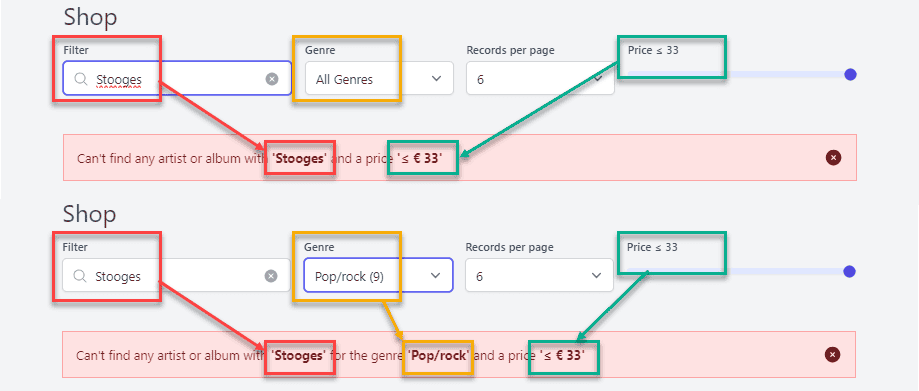
1: Alternative feedback message
- Show the selected genre and the price within the feedback message
2: iTunes top songs Belgium
Basic version
- Use the native Laravel HTTP-method to show the top 10 of Belgian iTunes albums for today
- Create a Livewire component (
Itunes) for this route: http://vinyl_shop.test/itunes - Get the top 10 Belgian albums from the iTunes API:
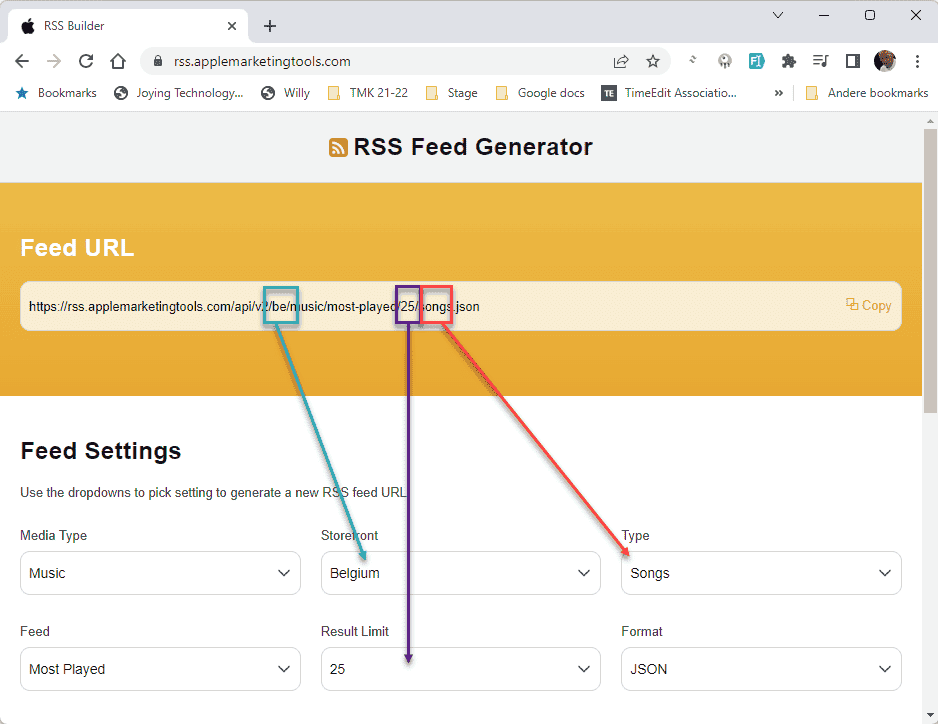
- Feed generator: https://rss.applemarketingtools.com/
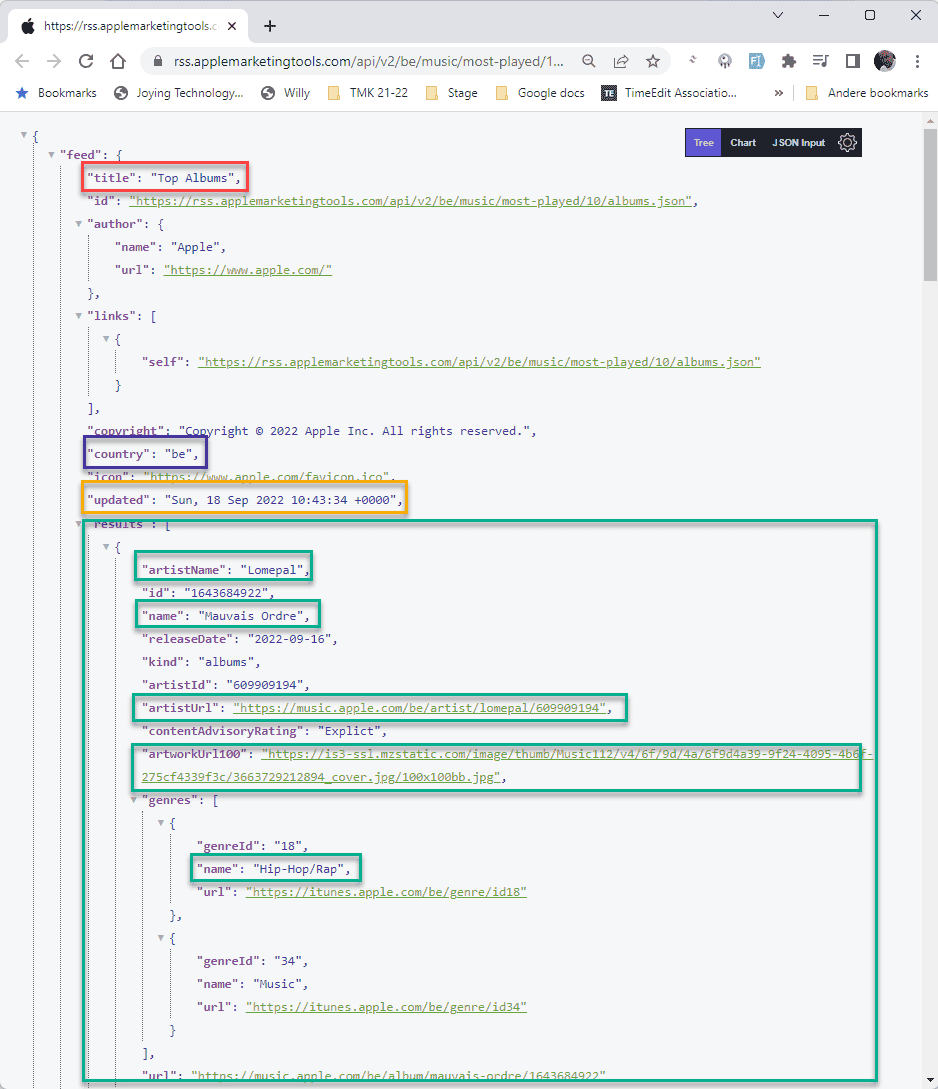
- JSON response for 10 songs: https://rss.applemarketingtools.com/api/v2/be/music/most-played/10/albums.json
TIP
This is a live feed and the content changes daily. Compare your result with the live preview (@it-fact.be)
Advanced version
- https://rss.applemarketingtools.com/
- Add some filters for:
- Storefront: (= country code)
be,nl,lu, ... in an<x-tmk.form.select>component - Result Limit:
6,10,12, ... in an<x-tmk.form.select>component - Type:
albumsorsongsin an<x-tmk.form.switch>component
- Storefront: (= country code)
- Don't forget the preloader